


Grocery shopping rarely fails because people do not know what they need. It fails because the information is scattered: one item is remembered in the kitchen, another appears in a message, and a third is noticed only after arriving home. I have found that AnyList is most useful when treated as a shared household memory rather than just a digital checklist. Its purpose is simple, but the difference comes from how quickly it turns loose thoughts into a list that can actually guide a shopping trip.
AnyList is a free productivity app from AnyList for Android and iOS. It focuses on shared shopping lists, recipe organization, and meal planning, so it sits somewhere between a basic notes app and a more specialized food-planning tool. The free entry point makes it easy to try, while in-app purchases ranging from $9.99 to $14.99 per item are available for people who want more from the experience.
What I like most is that the app addresses a repeated, ordinary annoyance: remembering groceries is not a one-time task. The list changes throughout the week, different people contribute to it, and the final shopping trip often happens under time pressure. A useful list therefore needs to be quick to update, easy to scan, and practical when someone else in the household is doing the shopping. AnyList generally succeeds because it keeps those actions close together instead of making me manage several separate notes.
Why the setup matters more than the shopping trip
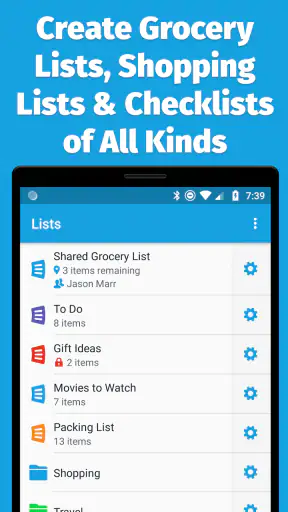
The first useful step is creating lists that match the way I actually shop. A single endless list can work, but it becomes harder to scan as it grows. I prefer separating recurring household needs from a specific trip or occasion. That makes the list less like a storage bin for every thought and more like a current plan.
Adding an item is intentionally straightforward. I can enter something as soon as I notice it is running low, rather than waiting until I am ready to plan the entire shop. That small habit is important: the app becomes valuable before the shopping trip, when the need is fresh, not only at the supermarket entrance.
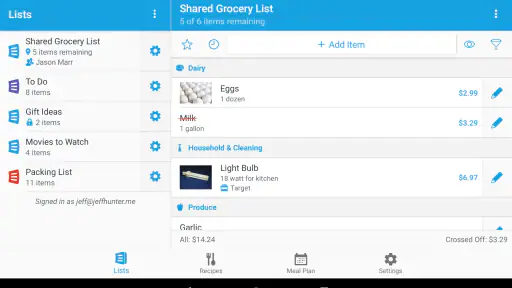
For a shared household, the best setup is to make one person responsible for maintaining the basic structure and let everyone contribute items. This avoids the common problem of several disconnected lists. A partner can add milk, a child can add a snack, and I can add ingredients for dinner without asking anyone to forward a message or rewrite a note.
The app is also more useful when I write items with enough context to prevent a second decision in the store. “Tomatoes” may be adequate for one household but not for another. Adding a variety, size, or intended recipe can reduce hesitation later. This is not a glamorous feature; it is a habit that makes the list more reliable.
AnyList has earned a 4.8 average from around 30 thousand ratings, and its reach is visible in more than 1 million installs. Those figures do not replace personal testing, but they help explain why the app feels designed around a common routine rather than an unusual niche. It is a mature choice for people who want a dedicated grocery tool instead of another general-purpose memo.
A practical workflow for meal planning
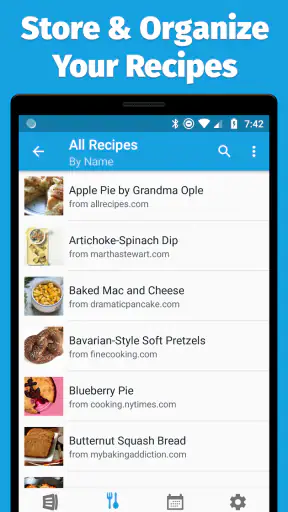
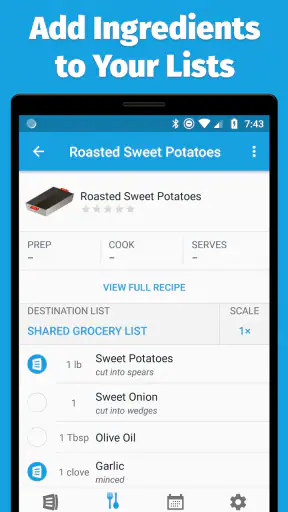
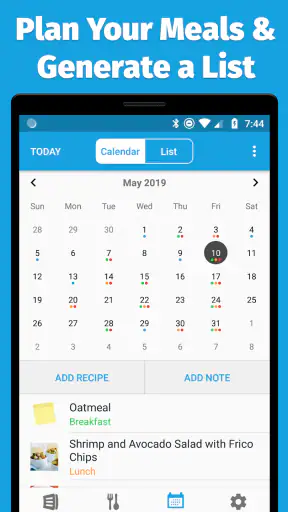
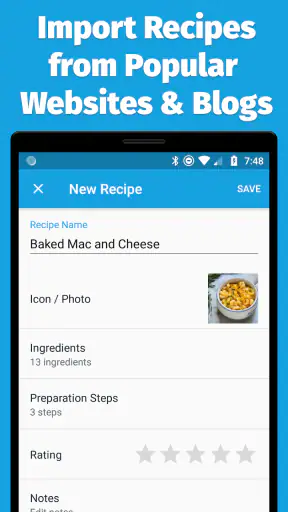
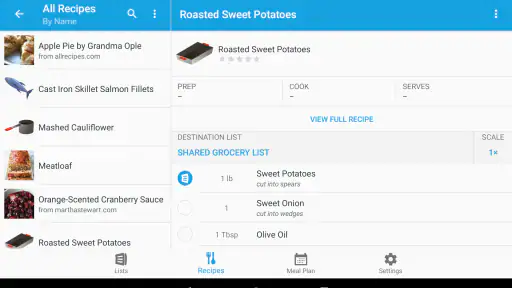
The strongest setup for me combines recipes with the shopping list. I can think about meals first, then use the ingredients as the bridge to the grocery run. This is more dependable than opening a recipe in one place and manually copying ingredients into a separate notes app, especially when planning several meals at once.
A useful technique is to plan only the meals that genuinely need ingredients. Pantry staples and flexible leftovers do not always deserve the same attention as a dinner that depends on fresh produce. By keeping the plan realistic, I avoid creating a long, ambitious menu that looks organized but is unlikely to survive a busy week.
Another helpful approach is to review the list before leaving, not while already walking through the store. I can remove items that have been supplied by another source, combine duplicate thoughts, and check whether a recipe requires something I nearly overlooked. This short review is where the app saves time: it moves decisions into a calmer moment.
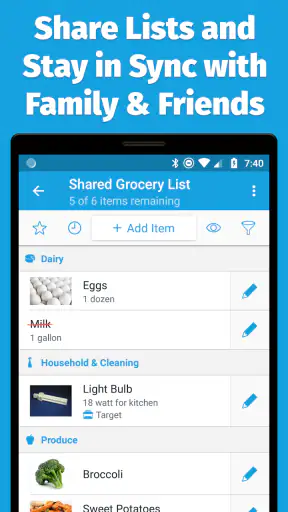
For a household with different schedules, shared editing is more useful than a simple export or screenshot. A screenshot freezes the list, while a shared list can keep changing. If someone buys an item early, another person does not need to guess whether it is still needed. That living-list quality is one of the clearest reasons to choose this app over a standard notes tool.
What a normal week looks like
Imagine a Wednesday evening when I notice that breakfast supplies are nearly gone. I add the items immediately. On Thursday, a family member remembers ingredients for a weekend meal and adds them from their own phone. On Friday, I organize the list before shopping, check the recipe plan, and remove anything already purchased. At the store, I mark items as they go into the cart instead of trying to remember what was written days earlier.
This scenario shows where AnyList earns its place. It is not doing one impressive task; it is preventing several tiny failures. Nobody has to send a message, search an old conversation, or ask whether an item was already bought. The time saved comes from reducing coordination, not from making grocery shopping exciting.
The same workflow works for people who shop in short visits. If I stop at a store after work, I can use a focused list rather than carrying the entire week’s planning in my head. For a larger weekend shop, the broader list and recipe context become more useful. The app adapts better to these two patterns than a paper list, which is easy to lose or leave behind.
It is also suitable for roommates, though the value depends on agreeing on naming and responsibility. A shared list can prevent duplicate purchases, but it cannot decide whether a shared item is urgent, optional, or reserved for one person. I would use clear wording and separate lists when household budgets or dietary needs differ significantly.
Where the app removes friction
The biggest improvement over a notes app is the separation between an item that still needs attention and one that has already been handled. That visual distinction matters during a busy shop. I do not want to reread a paragraph and mentally cross out products; I want the list to reflect progress as I move through the store.
Compared with paper, AnyList is easier to keep current across several people. Paper remains excellent for someone who enjoys writing by hand or shops alone with a short list, but it becomes awkward when the list changes remotely. The app is the better fit when groceries are a shared responsibility.
Compared with a general task manager, AnyList feels more focused on food. A task manager may be more flexible for work, errands, and household chores together, but that flexibility can make grocery entries feel like just another collection of tasks. AnyList keeps recipes, meal planning, and shopping closer to the same workflow.
Compared with a recipe-only service, it is more practical at the point of purchase. Recipe inspiration is not enough if the ingredients never become a usable shopping list. AnyList’s appeal is the connection between deciding what to cook and remembering what to buy.
There is a trade-off here. A dedicated app asks me to maintain one more place for information. If I already have a household system that everyone follows, moving to AnyList may not be worth the effort. The app pays off when the current system is fragmented, inconsistent, or dependent on one person remembering everything.
Small habits that make it more dependable
First, I avoid adding vague entries when the purchase could cause confusion. A little extra detail at the moment of entry is faster than resolving the question in the aisle. Second, I review the list after planning meals, because recipe ingredients can expose gaps that were not obvious in the everyday list. Third, I use the shared workflow only when everyone understands that checking an item off communicates a decision, not merely a temporary action.
I also recommend keeping the list honest. If I repeatedly add ambitious meals and never cook them, the grocery plan becomes noisy. Removing abandoned ideas is not just tidying; it improves the reliability of the list for whoever shops next. A shorter, current list is more useful than a comprehensive archive.
Another non-obvious benefit is that the app can make household labor more visible. When one person normally carries the entire memory burden, a shared list gives others a practical way to participate. It does not solve every disagreement about shopping or meal preparation, but it creates a common reference point instead of leaving the work inside one person’s head.
Where I noticed limits
AnyList is not a complete household management system. Someone looking for detailed budgeting, inventory accounting, or broad task coordination may find it too narrow. Its strength is the food-related workflow, so people who want one app for every kind of errand may prefer a flexible task manager.
Meal planning can also become a chore if I treat it as a demand to schedule every meal perfectly. The app helps organize a plan, but it cannot account for changing energy, unexpected invitations, or leftovers unless I update the plan myself. I see this as a limitation of the routine rather than a flaw unique to the app, but it is worth recognizing before committing to a highly structured system.
There is also a learning curve in deciding how much structure to create. Too little organization leaves the list messy; too much creates maintenance work. I get the best results with a few purposeful lists and clear item names, not with an elaborate hierarchy that requires constant administration.
The free price makes the trial low-risk, and the Everyone content rating makes it suitable for a broad household audience. However, users should decide whether the paid options match their needs before building an elaborate workflow around them. The important question is not whether every available capability is necessary, but whether the app’s central list-sharing and meal-planning routine solves a problem that occurs often enough.
My final view after using it as a daily utility
I recommend AnyList to couples, families, and roommates who repeatedly lose track of grocery needs or rely on scattered messages. It is especially effective when several people shop, when meals are planned from recipes, or when the same household supplies must be remembered week after week. The app’s real achievement is modest but valuable: it reduces the number of small decisions and reminders that otherwise interrupt the day.
I would skip it if I shop alone, buy only a few items, and already have a dependable paper or notes-based routine. I would also look elsewhere if I wanted detailed finances, full pantry inventory, or a universal task manager. In those situations, a more general tool may be better suited, even if it is less pleasant for recipe-based shopping.
For everyone else, the best way to judge it is to use it through an entire shopping cycle: add items when they occur, involve the people who actually shop, connect the list to one or two realistic meals, and review it before leaving. That test reveals whether AnyList removes friction from your household or merely gives you another place to type reminders.
My overall impression is positive because the app respects the repetitive nature of grocery planning. It does not need to turn shopping into a complicated project. When used with a little discipline, AnyList is a practical shared memory for food, and its time-saving value comes from keeping everyday decisions in one dependable place. For a free productivity app with a focused purpose, that is a strong reason to keep it installed.


